Finalizing the UI
What is still missing is that the time zone which we select from the list is also reflected in the displayed time.
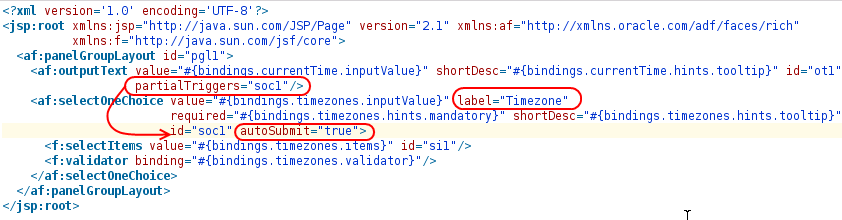
Now, we can see that the time is updated whenever a new entry is selected from the list, but the selected time zone is still not considered. We need to call the setTimezone() method on the data control to set the new time zone when an entry is selected from the list. To achieve this, we add a valueChangeListener to the af:selectOneChoice component:
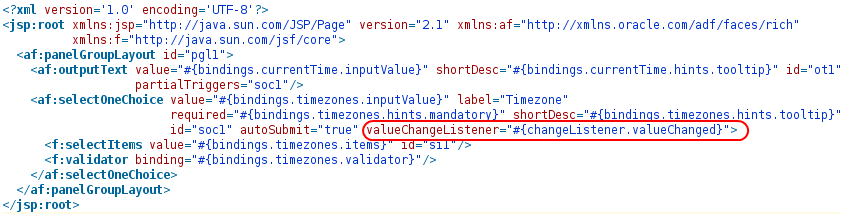
changeListener is a request scoped bean which we add to the task flow. Its valueChanged method is now called whenever a new entry is selected in the drop down list. In this method, we can retrieve the data control in the same way we would otherwise retrieve the application module. The difference is that the data provider which is returned by DCDataControl.getDataProvider() is not an application module, but our bean. So, we can simply call the setTimeZone() method as follows:
package com.example.adf.view.bean;

import javax.faces.event.ValueChangeEvent;
import oracle.adf.model.BindingContext;
import oracle.adf.model.binding.DCDataControl;

public class ChangeListener {

    public void valueChanged(ValueChangeEvent valueChangeEvent) {
        BindingContext bindingContext = BindingContext.getCurrent();
        DCDataControl dc  = bindingContext.findDataControl("DateBeanDataControl");
        DateBean bean = (DateBean) dc.getDataProvider();

        bean.setTimezone(valueChangeEvent.getNewValue().toString());
    }
}
With this final adjustment, we can see that the time is updated and considers the selected time zone whenever an entry is selected from the drop down list.